The status is computed, never typed
Open, booked, in transit, at customs, cleared, delivered, invoiced, closed: each status follows from the file’s facts and says why. Nobody quietly “fixes” a file.
Import, export and transit, by road, sea and air: MazaGTR Freight follows every international shipment file, prepares Moroccan customs, keeps the customer informed and shows the margin of every file.
No credit card · Import, export, transit · FR, EN, ES, AR
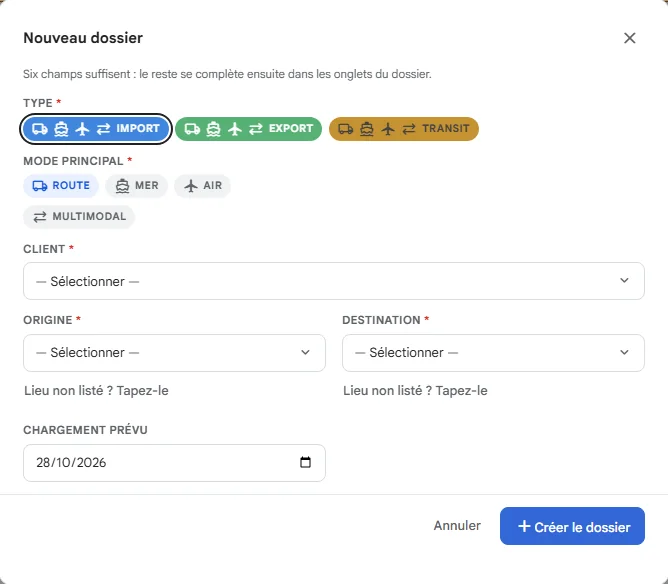
The quick-create screen: pick the type, the mode, the customer and the route, and the file exists, with its number. The rest is filled in when needed.
Import, export, transit: each type has its colour and its allowed modes. In the list, one glance is enough.
Nobody types “delivered”: the status follows from the transport units, the actual departures, the declaration and the release, and always says why.
Illustration animations, example figures: they do not come from a real account.
Declarant, regime, office, PortNet no., DUM no., circuit: the dates entered stamp the route’s customs milestones, with their source.
One line per item: HS code, description, origin, weight, value. Generated from the file’s cargo, to import into your BADR account.
Customs value, import duty, parafiscal tax, then VAT on the lot. It is an estimate: customs decides, and the gap with the assessed duties shows.
Illustration animations, example figures: they do not come from a real account.
No app to install: the driver gets a simple page, one button per step, the delivery photo and, if they accept, their position while the page is open.
Every step keeps its source, so you know who said what: you, the driver, a partner, the line or customs.
The carrier uses MazaGTR? Link your accounts with a code: “Send to carrier”, and its departures, arrivals and its vehicle’s position come back into your file.
Illustration animations, example figures: they do not come from a real account.
Sales minus purchases, line by line: an estimated margin at once, an actual margin when supplier invoices are attached. The day’s rate applies to currencies.
The duties paid to customs for the customer come from the customs block, stay outside VAT and are separated on the invoice, next to the services at their VAT rate.
A shared container or truck: its purchase cost is split between the files equally or by weight, and each line stays locked.
Illustration animations, example figures: they do not come from a real account.
The customer follows their files, uploads or downloads documents and requests a transport. You accept or refuse, and they are told.
One key per customer, shown only once: they send their transport orders, follow their files and receive signed notifications at every change.
Illustration animations, example figures: they do not come from a real account.
Departure, arrival at port, missing document, delivery: the message goes out on WhatsApp, with nobody making a call.
Each notice has its switch, off by default: you turn on what you want. The number of WhatsApp numbers depends on the plan.
Depending on the type and the mode: invoice, bill of lading, packing list, certificates. Present, missing or waived with a reason, and the missing count reads in the list.
One folder per customer for papers and proofs of delivery, shareable with them. Storage grows with the S, M, L and XL packs.
Each invoice is sealed when validated and carries a verification QR. The integrity chain lets you check that none has been altered.
Illustration animations, example figures: they do not come from a real account.
Margin by customer, by mode and by month, files without a supplier invoice, with CSV export and an alert when a margin turns negative.
Ask your questions in plain language, and have a badly typed address cleaned before it goes onto a file.
The file manager, the customs declarant, the accountant and management only see and do what concerns them, by screen and by action. The “Money” right is given separately.
French, English, Spanish and Arabic, with Arabic written right to left. The office, the driver and the customer read the same file, each in their own language.
Illustration animations, example figures: they do not come from a real account.
Open, booked, in transit, at customs, cleared, delivered, invoiced, closed: each status follows from the file’s facts and says why. Nobody quietly “fixes” a file.
The duties shown are an estimate, marked as such. When customs assesses, you enter the actual duties and the gap shows.
A disbursement paid on behalf of the customer stays outside VAT, carries its voucher and is kept apart from the services on the invoice.
Your invoices are already sealed, verifiable by QR code and archived. The connection to the official platform switches on as soon as its API is published.
Ready for the DGI e-invoicing (clearance model, UBL, electronic signature, ICE of seller and buyer). The connection is switched on as soon as the official API is published. The full data of every invoice can already be exported as XML (UBL).
Every invoice is sealed when it is validated, linked to the previous ones by an integrity chain, verifiable through a public QR code, and archived.
Spain (VERI*FACTU) and France (Factur-X, UBL, CII) are built in. Each country is switched on separately.
Announced calendar: in waves "during 2026", large companies first, SMEs and very small businesses in 2027-2028. The decree setting the dates and thresholds has not been published yet and no public technical specification exists so far.
Learn more: Tax authority (DGI) - tax.gov.ma Announced free portal: fatourati.gov.ma
It is the scheme of the Direction Générale des Impôts (article 145-IX of the General Tax Code, 2024 Finance Act): each invoice is validated by the DGI platform before it is legally issued, the so-called "clearance" model. The announced format is UBL 2.1 with a qualified electronic signature, and the ICE of both seller and buyer is mandatory. The roll-out is announced in waves "during 2026", large companies (turnover above 200 million dirhams) first, SMEs and very small businesses in 2027-2028. The decree setting the dates and thresholds has not been published yet and no public technical specification exists so far. A free portal, fatourati.gov.ma, is announced for small companies. Information: tax.gov.ma.
MazaGTR is ready on the invoice side: every invoice is already sealed when it is validated (integrity chain, public verification QR code, archive), and UBL 2.1, the electronic signature and the ICE are provided for in the invoicing engine. The connection to the DGI platform is switched on as soon as the official API is published, at no extra cost. The full data of every invoice can already be exported as XML (UBL).
Fill in the ICE, IF and RC in your company profile, and validate your invoices in the application. Nothing else: the rest switches on when the API is published.
A forwarder has no fleet to count: you choose the pack that fits the size of the team. Each pack sets its ceiling of office users and customer-portal users.
Prices exclude tax. The price shown is the invoice’s, not an estimate.
Each card lists what is included: the Freight screens on one side, the modules shared with the TMS on the other.
A 14-day trial, with one of your real import or export files.